Listings to Leads Review (2026): Pricing, Features, Trial and Who It Fits
Oct 26, 2026
Listings to Leads (L2L) is a listing-marketing and advertising tool for real estate agents, brokers and lenders. It turns your listings into single property websites, landing pages, social posts and Facebook, Instagram and Google ads, then sends the leads to your CRM.
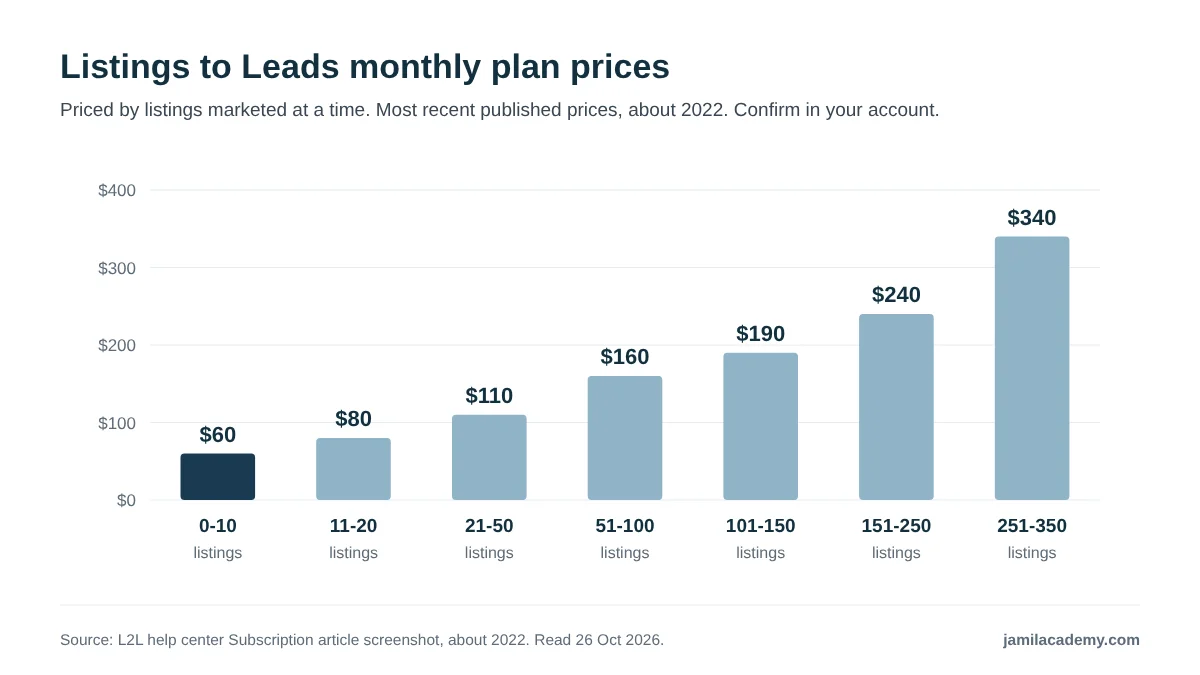
You pay by how many listings you market at a time. The most recent prices L2L has published run from $60 a month for up to 10 listings to $340 for 251 to 350. Agents get a 14-day free trial, and the account is month-to-month with no refunds.
Those prices come with a caveat. They sit in an in-app screenshot in L2L's help center that dates from around 2022, and the live pricing page did not load when checked on 26 October 2026. Confirm them on the plan screen during your trial.
Below: features, listing import, ads, CRM connections, pricing, the trial, cancellation and who it fits. I read L2L's help center, terms of use and website pages, plus third-party pages, on 26 October 2026.
Where I stand: I am a Realtor with Samson Properties in Virginia, and I run Jamil Academy, which sells training to agents. This is not a hands-on test: it is built from L2L's own documentation and public sources. I am also an L2L affiliate, as the box below explains.
I am a Listings to Leads affiliate. If you sign up through the links in this article, I may earn a commission at no extra cost to you. Agents who use a partner link get a 21-day free trial instead of the standard 14 days, according to L2L's help center.
This review uses only L2L's published documentation and third-party sources, and my opinions are my own.
Quick answer
- What it is: a listing-marketing and ad layer that feeds your CRM. It has basic follow-up tools, but it is not a full CRM.
- Pricing: by listing count. The newest published plan screen, from about 2022, shows $60 to $340 a month. An older homepage list shows $30 to $110. Confirm during the trial.
- Trial: 14 days for agents, or 21 days through a partner link. You can start the Listings to Leads trial with my partner link (affiliate link).
- Listings: imported from ListHub, not straight from your MLS.
- Ads: run through the Facebook or Google ad account you connect. L2L does not publish who is billed for ad spend, or any minimum.
- Terms: month-to-month, cancel at any point, no refunds or proration.
- Ratings: I found no third-party ratings to report.
- What is Listings to Leads?
- What features does Listings to Leads include?
- How do your listings get into Listings to Leads?
- How do Listings to Leads ads work, and who pays for them?
- Which CRMs does Listings to Leads integrate with?
- How much does Listings to Leads cost in 2026?
- How does the Listings to Leads free trial work?
- What will Listings to Leads cost you? Try the calculator
- Can you cancel Listings to Leads, and are there refunds?
- What do Listings to Leads reviews and ratings show?
- What changed at Listings to Leads in 2025 and 2026?
- How does Listings to Leads compare with other lead platforms?
- Who is Listings to Leads a good fit for, and who should skip it?
- Is Listings to Leads worth it? My verdict
- What I could not verify
- Frequently asked questions
What is Listings to Leads?
Short answer: a turnkey online marketing system built around your listings. It serves agents, brokers and offices, mortgage lenders and title reps, and MLSs.
L2L's About page describes the business this way: "We provide agents and brokers industry leading turnkey online marketing solutions and strategies that dramatically increase Online lead generation."
Source: beta.listingstoleads.com/about-us, read 26 October 2026.
In practice, that means the tool takes listing data and builds marketing from it. Leads from that marketing land in L2L, and from there in the CRM you connect. That is why I call it a layer, not a replacement for your CRM or IDX website.
Who runs it
- Address: 9580 Oak Ave. Parkway, Ste. 7-127, Folsom, CA 95630, per its About page.
- Leadership: the About page names Scott Pierce, "A former technology insider", and Vincent Meza, Vice-President of Sales.
- Founder: a July 2026 promotional newsletter from Labcoat Agents calls Scott Pierce "Founder and CEO of Listings-to-Leads".
- Track record: the help center's Getting Started article, updated January 2025, says its tools are "the result of 10 years of working with successful agents".
- Founding year: not stated on any official page I could read.
Sources: beta.listingstoleads.com/about-us; L2L help center, Getting Started; labcoat-agents.beehiiv.com (third party). All read 26 October 2026.
Names, spellings and look-alikes
You will see the brand written several ways. The help center and terms use "Listings-to-Leads", Zapier uses "Listings To Leads", and the domain is listingstoleads.com. L2L uses "L2L" on its own pages.
Two different companies have similar names. Leads2List shows up on Capterra and GetApp when you search for L2L alternatives. ListingLeads.com is a separate company with its own Follow Up Boss integration. Neither is the product reviewed here.
My view: check the domain before you read any review or sign up. Search results mix these three brands, and that makes it easy to read the wrong company's reviews.
What features does Listings to Leads include?
Short answer: listing websites, paid social and Google ads, ready-made content, and follow-up tools. The help center groups them into ten categories.
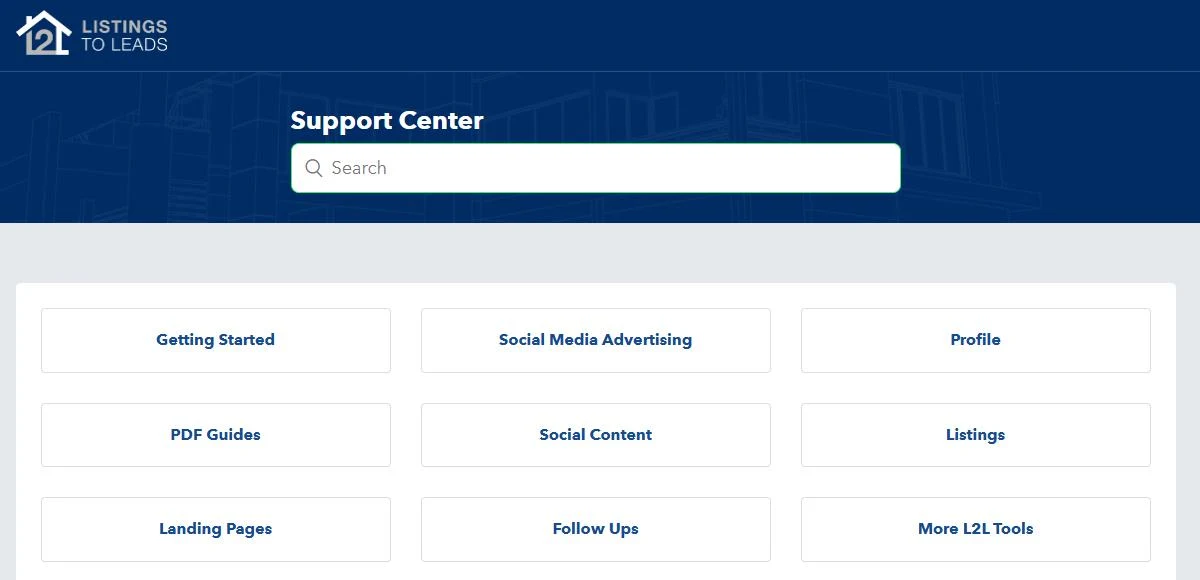
The ten help center categories are Getting Started, Social Media Advertising, Profile, PDF Guides, Social Content, Listings, Landing Pages, Follow Ups, More L2L Tools, and Brokers and Lenders. Here is what sits under them.
Listing websites and landing pages
- Single property websites for each listing, which its agent training page calls "Beautiful on smartphones and tablets".
- Listing landing pages and market report websites, both on the homepage feature list.
- A free WordPress listing blog: "Every account gets a free WordPress listing blog that we auto post your listings to!"
- Custom domains, a section in the Profile category.
Ads
- Facebook and Instagram lead ads for listings, landing pages, PDF guides, plus a custom option.
- Traffic ads that send people to a listing page.
- Auto campaigns: the agent training page promises "Proven 5+ piece auto marketing campaigns" on Facebook.
- Google Ads, covered in a help article dated November 2023, plus Messenger bots, custom audiences and Facebook pixels.
Content
- PDF guides, with a social post, eFlyer, short-form video script, postcards, print flyers, a database script and Spanish versions.
- Video: auto YouTube listing videos, and short-form video scripts for Instagram, TikTok and YouTube on the dashboard.
- Social auto-posting to Facebook, X, LinkedIn, Instagram and Google My Business.
Follow-up and lead tools
- Follow Ups: campaigns, email blasts and contact lists.
- AI Text Follow-ups, a paid add-on "designed to automate communication with new leads".
- Client reviews: "You can now manually add and import reviews".
- IVR and text sign riders, described as "Automated Interactive Voice Response" with short code texting.
- Prospecting tools: FSBO and expired tools, phone scripts, open house and listing presentation material.
For brokers and lenders
The Brokers and Lenders category covers "Brokers - Automated Recruiting Ads" and "Brokers - Automated Ads for Listings (Facebook & Instagram)". On the homepage, the second price block, which reads like the broker tier, says "Full recruiting platform included!" There are also separate sections for lenders and MLSs.
The help center also lists extra services, described as "an extra service from your monthly subscription." Ask for the price of any service before you order it.
Sources: L2L help center category and article pages; beta.listingstoleads.com/agent-training; www.listingstoleads.com homepage. All read 26 October 2026.
One caution on dates. Several features above come from the homepage text, which carries a 2014 copyright footer. The help center is newer, so treat it as the better guide, and check each feature you care about inside the trial.
My view: that is a long list for one subscription. Most agents will use three or four pieces. Decide which ones before the trial starts, so you test those and ignore the rest.
How do your listings get into Listings to Leads?
Short answer: through ListHub, not directly from your MLS. L2L imports your listings from the ListHub syndication feed and updates them on a schedule.
L2L help center, "Why my Listings are not been imported automatically", dated 3 February 2021
The onboarding article, dated October 2024, says the same: "We get them from ListHub." The homepage promises "Auto import & daily update of listings!"
The homepage also describes L2L as a ListHub partner, a SPARKS member and a KWLS vendor. That wording is paraphrased from the homepage, which carries the 2014 footer.
Sources: L2L help center articles on listing import and account onboarding; www.listingstoleads.com homepage. Read 26 October 2026.
Why this matters
- Your listing has to reach ListHub first. If your MLS or brokerage does not send listings there, automation may not pick them up.
- Updates follow the feed. A change reaches L2L through ListHub, so expect a delay after you edit the MLS.
- There is a help article for failed imports, which tells you this is a known support question.
Your plan tier depends on how many listings you market at a time, so the import matters for cost too. More on that in the pricing section.
If you are still deciding whether a page per listing is worth having at all, start with my guide to single property websites.
My view: on day one of a trial, check that every active listing you have has imported. If one is missing, ask support how it would get in before you go further.
How do Listings to Leads ads work, and who pays for them?
Short answer: L2L builds the ads, and they run through the Facebook or Google ad account you connect. L2L's help pages do not say who is billed for the ad spend, or name any minimum or markup.
What the help center shows
| Ad tool | What the help center lists |
|---|---|
| Facebook and Instagram lead ads | Articles for Listings, Landing Pages, PDF Guides and Custom |
| Traffic ads | An article for Listings |
| Audiences and tracking | L2L Custom Audiences and Facebook Pixels |
| Messenger bots | A BOTS section, such as "How to create Facebook ads with L2L BOTs" |
| Google Ads | "You can now create Google Ads with your Listings-to-Leads account." (November 2023) |
Source: L2L help center, Social Media Advertising category, read 26 October 2026.
Whose ad account is it?
The Connect Ad Account article, dated January 2025, tells you to "connect the Facebook account you use to create Facebook ads". So the ads run through an ad account you control.
The Google Ads article has you set a daily spend during setup. It also says "we recommend you use an IDX link you create with a specific search", so plan to have an IDX search page to point those ads at.
Sources: L2L help center, Connect Ad Account (14 January 2025) and Google Ads IDX (9 November 2023), read 26 October 2026.
What L2L does not publish
I found no official page that says whether ad spend is charged by Meta and Google directly or by L2L. None names a minimum budget or a markup on spend. Ask these three questions in writing before you turn ads on:
- Is ad spend billed by the ad platform to my own card, or by L2L?
- Is there a minimum daily or monthly budget?
- Is there any fee or markup on top of the spend?
If you have not run listing ads before, my guide to running Facebook ads as a real estate agent is a good place to start.
My view: the software fee is the small number. Ad spend is where the money goes, so set the daily budget yourself and check it in your ad account every week.
Which CRMs does Listings to Leads integrate with?
Short answer: a long list, including Follow Up Boss, Lofty, BoldTrail, Sierra Interactive and GoHighLevel. The help center has 22 articles in its "CRM: Integrations" section.
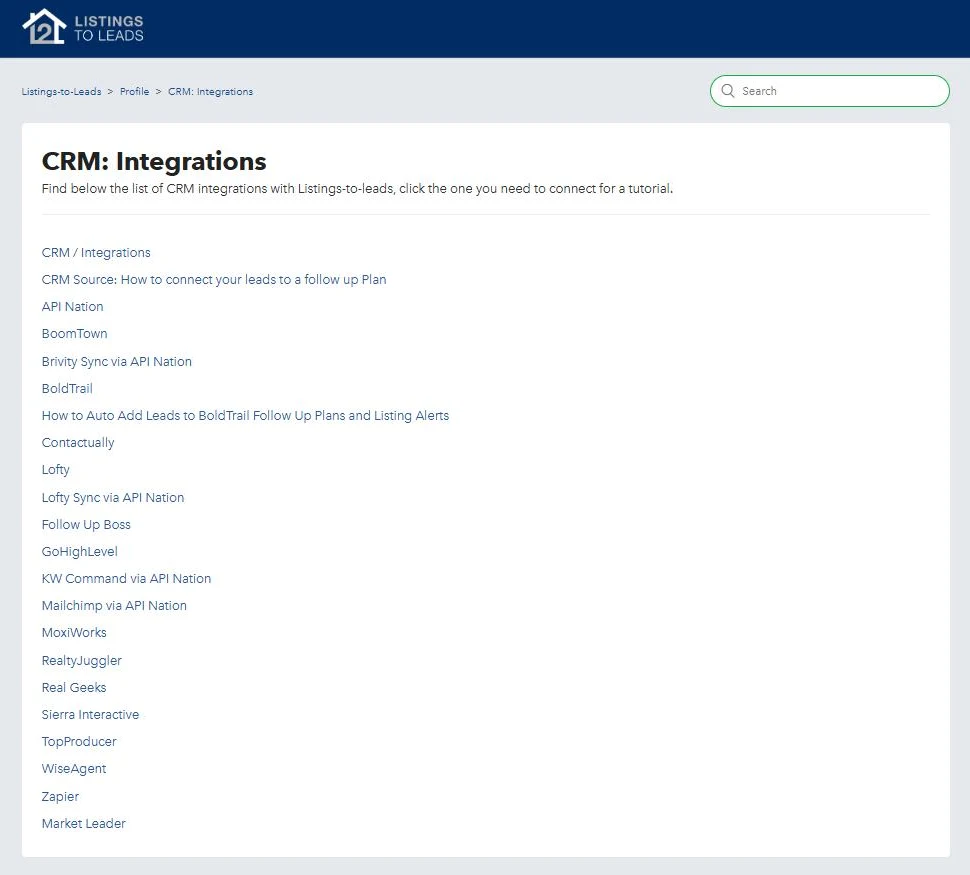
| CRM or tool | How the help center lists it |
|---|---|
| Follow Up Boss | Its own article. You enter your Follow Up Boss email address |
| BoldTrail | Its own article, plus one on adding leads to BoldTrail follow-up plans and listing alerts |
| Lofty | Its own article, and a second one for syncing via API Nation |
| GoHighLevel | Its own article, which calls it a new integration (dated August 2026) |
| BoomTown, Contactually, Market Leader, MoxiWorks | Their own articles |
| Real Geeks, RealtyJuggler, Sierra Interactive | Their own articles |
| TopProducer, WiseAgent, Zapier | Their own articles |
| Brivity, KW Command, Mailchimp | Connected "via API Nation", per the article titles |
Source: L2L help center, CRM: Integrations section, read 26 October 2026.
Follow Up Boss
L2L's Follow Up Boss article asks for your "Follow Up Boss Email Address". On the Follow Up Boss side, its help center files L2L under "Email Parsing Integration" and tells you to "Paste your FUB Lead Email Address".
So leads reach Follow Up Boss by email, which Follow Up Boss then reads. If you are weighing that CRM, see my Follow Up Boss review.
Sources: L2L help center, Follow Up Boss (7 June 2023); Follow Up Boss help center, Listings To Leads (L2L) (3 September 2024, third party). Read 26 October 2026.
GoHighLevel, Zapier and others
- GoHighLevel: "You can now sync your incoming leads from Listings-To-Leads directly into GoHighLevel (GHL) with our new integration!" (help article updated 13 August 2026).
- Zapier: Zapier's help page lists one trigger, "New Lead", and no actions. Its templates include "Create Real Geeks leads for new Listings To Leads leads".
- ActiveCampaign: its app directory describes the connection as "Simplify your marketing with landing pages and automated seller lead ads."
- API Nation: several connections run through it. Check whether it needs its own account or subscription.
Sources: L2L help center, GoHighLevel; zapier.com/apps/listings-to-leads/help; activecampaign.com/apps/listings-to-leads-integration (third party). Read 26 October 2026.
Through Zapier, data flows out of L2L when a new lead arrives. With no actions listed, Zapier cannot push data back in, so treat that route as one-way.
My view: in the first week of a trial, submit a test lead on one of your own listing pages. Then check it lands in your CRM with the right source tag and starts the right follow-up plan.
How much does Listings to Leads cost in 2026?
Short answer: the most recent prices L2L has published run from $60 to $340 a month, by how many listings you market at a time. They come from an in-app screenshot in its help center, dated around 2022.
www.listingstoleads.com did not load in a browser check on 26 October 2026, so its live pricing section could not be confirmed. The prices below are the newest ones L2L has published that could be read. Neither set is confirmed as today's price. Check the plan screen inside your account during the trial.
| Listings marketed at a time | Monthly price shown | Per listing at the tier maximum (derived) |
|---|---|---|
| 0 to 10 | $60 | $6.00 |
| 11 to 20 | $80 | $4.00 |
| 21 to 50 | $110 | $2.20 |
| 51 to 100 | $160 | $1.60 |
| 101 to 150 | $190 | $1.27 |
| 151 to 250 | $240 | $0.96 |
| 251 to 350 | $340 | $0.97 |
Source: L2L help center, "Subscription" article, embedded screenshot of the in-app Change Plan window, read 26 October 2026. The screenshot shows an upcoming bill dated 21 April 2022. Per-listing figures are my arithmetic.
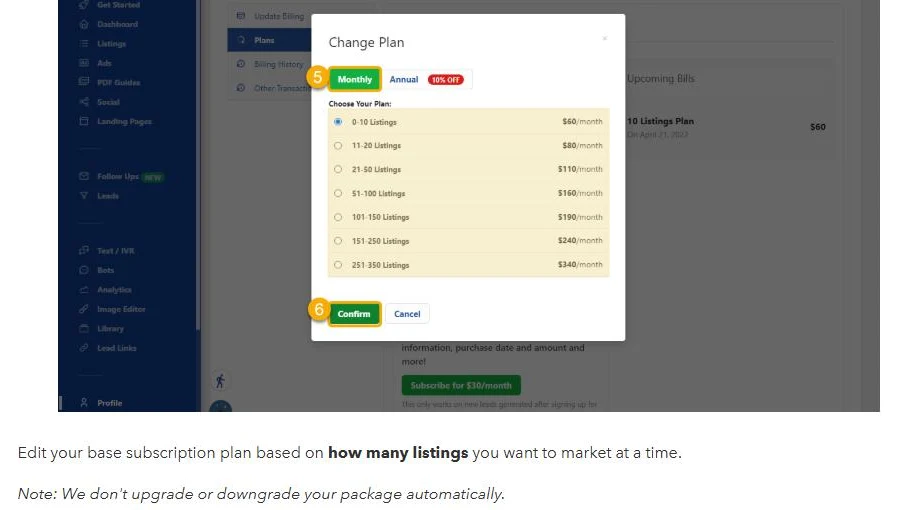
The help article says: "Edit your base subscription plan based on how many listings you want to market at a time." It adds: "We don't upgrade or downgrade your package automatically."
So if your listing count grows past your tier, you change the plan yourself. The article also says "we have monthly and annual plans."
To see the plan screen for yourself, you can try Listings to Leads free through my partner link. Affiliate link: I may earn a commission.
The older homepage prices
A text capture of the www.listingstoleads.com homepage shows lower prices in two unnamed blocks. That page carries a 2014 copyright footer, so these figures may be years out of date.
| Listings | Block 1 (likely agent) | Block 2 (likely broker, recruiting included) |
|---|---|---|
| 0 to 10 | $30 | $40 |
| 11 to 20 | $50 | $70 |
| 21 to 50 | $75 | $100 |
| 51 to 100 | $110 | $220 |
| 101 to 150 | Not listed | $270 |
| 151 to 300 | Not listed | $320 |
Source: www.listingstoleads.com homepage text, "Copyright © 2014" footer, text capture of 26 October 2026. Block labels are my reading, since the page names no plans.
The same page says: "Program is month-to-month, no set-up fee and a lead generation specialist will set-up your account once you begin your free trial."
Cost per listing
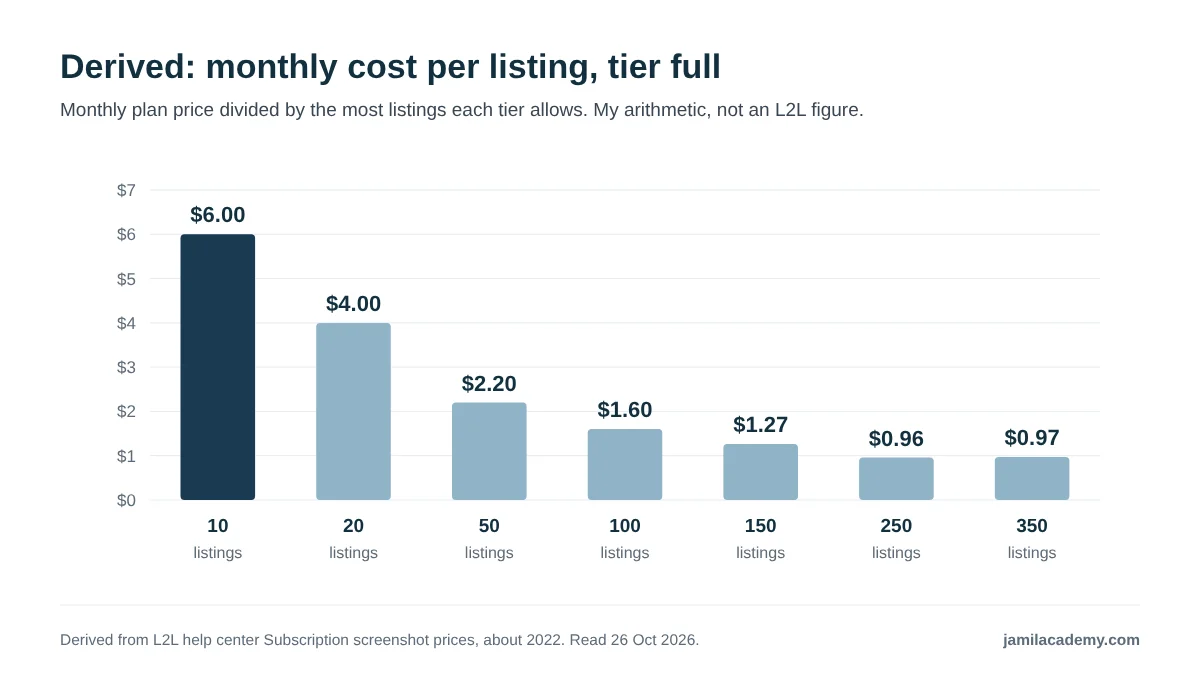
Per listing, the cost falls steeply up to about 100 listings, then flattens. The 151 to 250 tier works out a cent cheaper per listing than the top tier.
These figures assume each tier is full. A solo agent with 3 listings on the $60 tier pays $20 per listing a month. Size the tier to the listings you really carry.
Annual plans and add-ons
- Annual billing: the screenshot shows an Annual tab with a "10% OFF" badge. Annual prices are not published.
- Year-end sale: the article mentions 10% off annual plans for agents in a year-end sale, with no date. Treat it as expired.
- Partial to Full Lead Converter: a billing screenshot in the same article shows a "Subscribe for $30/month" button.
- Text and IVR: billed as "monthly recurring depending on subscription + $ per IVR lead / $ per text lead", with no amounts given.
- AI Text Follow-ups: no price published. The setup article only says "Select the right package".
- Lender and MLS plans: no prices published.
Sources: L2L help center, Subscription, AI Texts Follow-Ups Subscription and Lenders Plans articles; beta.listingstoleads.com/about-us. Read 26 October 2026.
My view: the plan fee is modest next to ad spend. The bigger unknowns are the add-on prices, so get those in writing before you switch any of them on.
How does the Listings to Leads free trial work?
Short answer: agents get 14 days free, or 21 days through a partner link. Lenders and title reps get 30 days, or 45 through a partner link.
| Who | Standard trial | Through a partner link |
|---|---|---|
| Agents | 14 days | 21 days |
| Lenders and title reps | 30 days | 45 days |
Sources: www.listingstoleads.com homepage; L2L help center, Agents Refer & Earn (21 May 2025) and Lender Affiliate Program (23 May 2025). Read 26 October 2026.
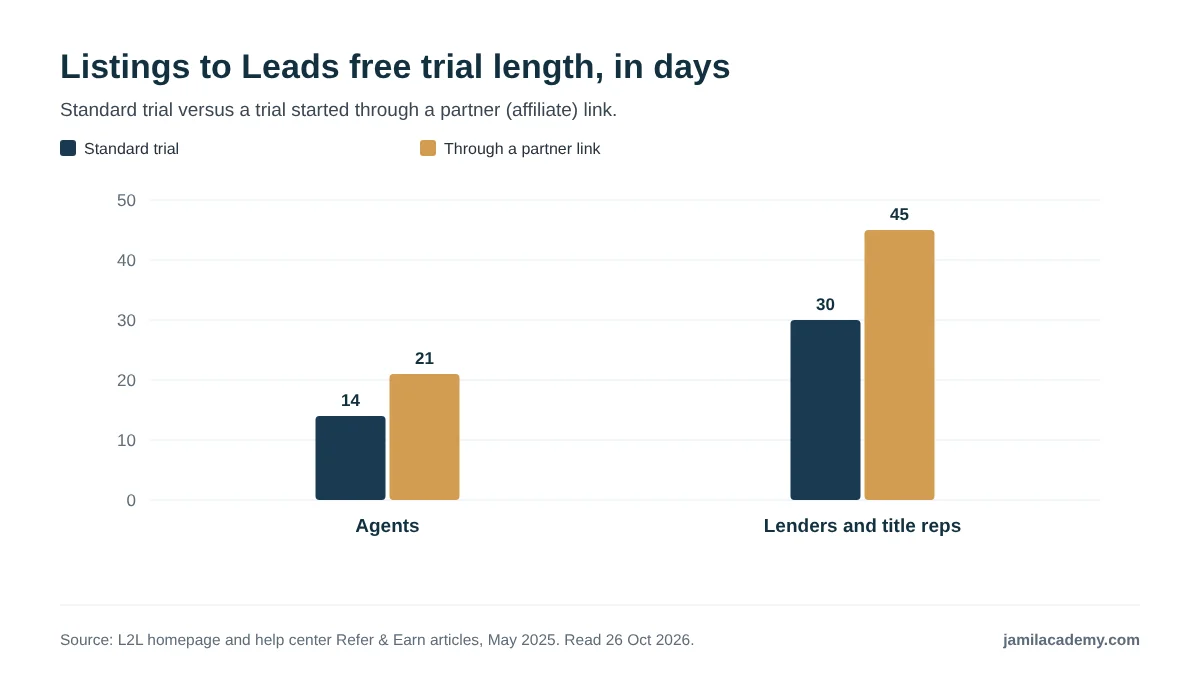
The help center puts it plainly: "Agents using your link will get a 21 day free trial instead of a 14 day one." The terms of use add: "Only one free trial is allowed per person".
The homepage says a lead generation specialist will set up your account once the trial begins. I did not find whether the trial asks for a card up front, so check the signup form.
What to test during the trial
- Listing import: every active listing appears, with correct photos and price.
- Plan screen: the current monthly and annual prices for your listing count. Screenshot them.
- Ad account: connect Facebook, set a small daily budget, and see where the charge lands.
- CRM routing: a test lead reaches your CRM with the right source and follow-up plan.
- Add-on prices: AI texts, Text and IVR, and any service you might use.
- Cancellation: find the cancel screen and note what it says about refunds.
My view: 14 days is short for judging ad results. Do the setup work in the first two days, so the ads have most of the trial to run.
What will Listings to Leads cost you? Try the calculator
Short answer: on the smallest published tier with $300 a month in ads, about $2,160 over six months. Change the inputs to match your listings, budget and closing rate.
The calculator uses the plan prices from L2L's help center screenshot, which dates from around 2022. Enter your own price if the plan screen shows something different. Ad spend is a separate line, since it runs through your own ad account.
Lead numbers, closing rate and commission are your own assumptions, not L2L figures. L2L publishes no lead or results data. Tier prices come from a help center screenshot of about 2022 and are not confirmed as current. Add-ons, taxes and any ad fees are left out, because L2L does not publish add-on prices or ad fees.
How the calculator counts
- Software cost: the tier price, or your own price, times the months.
- Total spend: software plus your monthly ad spend, times the months.
- Cost per lead: total spend divided by all the leads you expect over the period.
- Expected closings: total leads times your closing rate.
- Break-even closings: total spend divided by your average commission.
- Per listing: the monthly price divided by the most listings the tier allows.
Your closing rate is the number that matters most, and only your own history can tell you what it is. For how this kind of spend compares with buying leads elsewhere, see my breakdown of what real estate lead generation costs.
My view: run it once with the leads you hope for, and once with half. If the half case still breaks even, the risk is small.
Can you cancel Listings to Leads, and are there refunds?
Short answer: yes, you can cancel at any time, but you will not get money back. The account is month-to-month, and cancelling ends it immediately with no refund or proration.
| Term | What L2L says | Where |
|---|---|---|
| Contract | "Your Listings-to-Leads account is month-to-month." | Terms of use |
| When you can cancel | At "any stage of your billing period" | Help center, Cancel Account (March 2025) |
| Refunds | Cancelled "immediately with no refund or proration of payment." | Terms of use |
| Lender refunds | "no refunds will be given" | Help center, Lenders Cancel Account (February 2025) |
| Coming back later | Reactivation is at current pricing | Help center, Cancel Account (March 2025) |
| Plan size | "We don't upgrade or downgrade your package automatically." | Help center, Subscription |
| Price changes | Account pricing is subject to change at any time | Terms of use |
| Free trials | "Only one free trial is allowed per person" | Terms of use |
Sources: beta.listingstoleads.com/terms-of-use ("LAST REVISED: May 21, 2018") and L2L help center articles, read 26 October 2026. The cancel article's no-refund point is paraphrased from a required confirmation checkbox.
The terms I read were last revised in May 2018. The current terms may differ, so read the version shown when you sign up.
What this means in practice
- No lock-in. Unlike platforms with 12-month agreements, you can leave after any month.
- No partial refund. Cancel on day 3 of a billing period and you lose the rest of that period.
- Coming back may cost more. Reactivation is at whatever the price is then.
- Plan size is on you. If your listings drop, downgrade yourself, because L2L will not.
My view: if you decide to leave, cancel close to the end of a paid period, with a few days of margin before it renews. Take a screenshot of the confirmation.
What do Listings to Leads reviews and ratings show?
Short answer: I found no third-party ratings I could verify. I am not quoting any star rating or review count, because none checked out.
| Platform | What I found |
|---|---|
| G2 | No L2L profile found. A guessed product page returned an error |
| Capterra and GetApp | No L2L listing found. Searches surface Leads2List, a different product |
| Trustpilot | Page returned an error. I could not confirm whether a profile exists |
| BBB | No listing found in searches for Folsom, California |
| L2L's page exists, per the About page footer link, but it did not load | |
| L2L's own homepage | 7 undated testimonials and no overall rating |
Source: my research checks on each site, 26 October 2026.
The homepage testimonials are short, positive and undated. One reads: "This product rocks. Love, love listings to leads." They are the vendor's own selection, so they tell you little.
I also searched for independent reviews of the tool. On 26 October 2026, the results for "listings to leads review" were mostly Zapier app pages and unrelated help documents.
My view: with no public review base, ask L2L for two current users in your market, and call them. Ask how many leads their listing ads produced, and how good those leads were.
What changed at Listings to Leads in 2025 and 2026?
Short answer: new AI texting, review tools and a GoHighLevel integration. I found no evidence of price changes, acquisitions or funding in 2025 or 2026.
| Date | Change |
|---|---|
| October 2024 | Dashboard redesign, with short-form video scripts on the dashboard |
| January 2025 | AI Text Follow-ups: a help article dated January 2025 says "We now have AI Text Follow-ups available." The feature article was updated in January 2026 |
| January 2025 | Getting Started guide rewritten around L2L's "Top 5 tools" |
| February 2025 | Client Reviews: "You can now manually add and import reviews" |
| March 2025 | Cancel flow updated: no refunds, reactivation at current pricing |
| May 2025 | Affiliate program articles, including the 21-day and 45-day partner trials |
| August 2026 | New GoHighLevel integration |
Source: dated L2L help center articles, read 26 October 2026. Each date is the one shown on the article, which the help center labels as an update date, so a feature may be older than the date shown.
My view: the help center is clearly maintained in 2026. The public homepage text I could read is not, which is why the pricing above carries a caveat.
How does Listings to Leads compare with other lead platforms?
Short answer: it is not a like-for-like rival to most lead platforms. It plugs into many of them, as a listing-marketing source that feeds their CRM.
L2L publishes no comparison pages that I could find, and the homepage names no competitors. Its CRM list includes BoldTrail, Lofty, Real Geeks, Market Leader, Sierra Interactive, BoomTown and Top Producer.
| Type of tool | Examples | How L2L relates |
|---|---|---|
| Listing marketing and ad layer | Listings to Leads | The product reviewed here |
| Website and ads platforms | Ylopo, Luxury Presence, AgentFire, Placester | Overlap on ads and sites. Compare on what you would actually use |
| IDX website plus CRM | Real Geeks, Lofty, BoldTrail, CINC | L2L lists integrations with Real Geeks, Lofty and BoldTrail |
| Seller and prospect lead generation | SmartZip, Zurple | A different job, though ActiveCampaign's listing for L2L mentions automated seller lead ads |
Grouping is my own editorial view, not a sourced comparison. Integration facts: L2L help center, read 26 October 2026.
Placester's list of the top 10 real estate lead generation companies, last updated in August 2026, does not mention L2L. It is one sign of how little independent coverage the tool gets.
If you are weighing a full website and ads platform instead, my breakdown of Ylopo pricing is a useful comparison point. Compare on the parts you would actually use.
My view: if you already pay for an IDX website and CRM, L2L adds listing marketing on top. If you have neither, you need more than L2L alone.
Who is Listings to Leads a good fit for, and who should skip it?
Short answer, in my view: listing agents and brokers who want listing ads and pages done for them, feeding a CRM they already use.
It can fit if you
- Carry several active listings and want a page, ad and content set for each without building them by hand.
- Already use one of the CRMs on its list, such as Follow Up Boss, Lofty, BoldTrail or GoHighLevel.
- Want month-to-month terms rather than a 12-month agreement.
- Run a brokerage and want automated recruiting ads, or listing ads for your agents.
- Are a lender or title rep marketing with agents, using the lender plans.
Think twice if you
- Have no listings, or one at a time. The tool is built around listings, and the smallest published tier covers up to 10.
- Need a full CRM. L2L has follow-up campaigns and email blasts, but it is built to feed a CRM.
- Need your listings to come straight from the MLS. L2L imports from ListHub.
- Have no budget for ad spend. Much of the tool is built around paid ads.
- Want proof from independent reviews before you buy. I could not find any.
If you fit the first list, the 21-day trial should be long enough to test the import, the ads and your CRM routing. You can start a 21-day Listings to Leads trial here (affiliate link).
My view: L2L makes most sense for an agent whose listings are the main marketing asset. For a buyer-focused agent, the money is better spent elsewhere first.
Is Listings to Leads worth it? My verdict
Short answer: for a listing agent who already has a CRM and will fund ads, it is worth a trial. For a new or buyer-focused agent, probably not yet.
| Strengths | Weaknesses |
|---|---|
| Month-to-month, and the homepage says no setup fee | No refunds or proration when you cancel |
| Broad listing marketing: pages, ads, PDFs, video scripts | Current prices not confirmed; newest published screenshot is from about 2022 |
| 22 CRM integration articles, including GoHighLevel in 2026 | Listings come from ListHub, not directly from the MLS |
| Help center actively updated in 2025 and 2026 | Ad spend billing, AI text and IVR prices not published |
| Free trial, longer through a partner link | No third-party ratings to check |
The case for L2L is simple: it turns listings you already have into ads and pages, and routes the leads to your CRM. The case against is the gaps in what it publishes.
If you try it, open your Listings to Leads trial (affiliate link), then use the checklist in the trial section. Confirm the price, the ad billing and the add-on costs before the first charge.
My view: I would judge it on the numbers you see in your own account in the first two weeks, not on any vendor page, including this one.
What I could not verify
These are the gaps I hit while checking sources. Be careful with any page that fills them with a confident number.
- Current live pricing. www.listingstoleads.com did not load on 26 October 2026. The newest published prices date from about 2022.
- Annual plan prices. Only a "10% OFF" badge is shown.
- Lender and MLS plan prices, the AI Text Follow-ups price, a Google Ads premium price and the per-lead Text and IVR fees.
- How ad spend is billed, and whether there is a minimum or markup.
- Whether the trial needs a card at signup.
- Founding year, legal entity name and customer numbers.
- Third-party ratings on G2, Capterra, Trustpilot, BBB and Facebook.
- Whether L2L offers a full IDX search website. A Google Ads article mentions IDX links, but no official page describes one.
- Current terms of use. The version I read was last revised in May 2018.

Frequently asked questions
What is Listings to Leads?
Listings to Leads (L2L) is a listing-marketing and ad tool for agents, brokers and lenders. It builds single property websites, landing pages and social ads from your listings, then sends leads to your CRM.
How much does Listings to Leads cost?
The newest prices L2L has published, in a help center screenshot from about 2022, run from $60 a month for up to 10 listings to $340 for 251 to 350. Confirm current prices during the trial.
Does Listings to Leads have a free trial?
Yes. Agents get 14 days, or 21 days through a partner link. Lenders and title reps get 30 days, or 45 through a partner link, according to L2L's help center.
Can I cancel Listings to Leads at any time?
Yes. The account is month-to-month and can be cancelled at any stage of the billing period, but L2L's terms say there is no refund or proration.
Is Listings to Leads a CRM?
Not a full one. It has follow-up campaigns and email blasts, but it is built to feed a CRM. Its help center has 22 CRM integration articles, including Follow Up Boss, Lofty and BoldTrail.
Where does Listings to Leads get my listings?
From ListHub, not directly from your MLS. L2L's help center says: "We don't pull the Listings from the MLS we pull them from ListHub."
Who pays for Listings to Leads ad spend?
L2L has you connect your own Facebook ad account, and Google Ads setup includes a daily spend. It does not publish who is billed, or any minimum or markup. Ask before you start.
Does Listings to Leads work with Follow Up Boss?
Yes. L2L asks for your Follow Up Boss email address, and Follow Up Boss's help center lists the connection under email parsing.
Are there Listings to Leads reviews on G2 or Trustpilot?
I could not find any third-party ratings. The G2 and Trustpilot pages I tried did not load, and Capterra searches showed Leads2List, a different product.
Saad Jamil is a top 1 percent Realtor with Samson Properties in Chantilly, Virginia, licensed in Virginia, DC, Maryland and West Virginia since 2013, with more than $500 million in career sales and 900+ homes closed. Reviews and closed sales are on his Zillow profile. He runs Jamil Academy, which sells training to agents. This article is general information, not legal or financial advice, checked on 26 October 2026.
Free: 5 Ways to Get More Listings Without Cold Calling
Five lead strategies that work without cold calls or ad spend, from an agent with $500M sold and 900+ homes closed.
No spam. Unsubscribe any time.
Your Coach