Google Local Services Ads for Real Estate Agents (2026): Cost, Requirements and Setup
Nov 04, 2026
Google Local Services Ads for real estate are pay-per-lead ads. You pay when a buyer or seller calls, messages or books you through the ad, not when someone clicks or sees it. To run them, you must pass Google's verification, which for agents includes license checks.
What does a lead cost? Google does not publish a price for real estate. Its help page says lead prices vary by location, job type, lead type and bidding mode. You set a budget, and Google recommends a budget of at least 10 leads a week.
I read Google's help pages and blog on 4 November 2026 for everything below.
Where I stand: I am a Realtor with Samson Properties in Virginia, and I run Jamil Academy, which sells training to agents. This is not a hands-on test. It is built from Google's own pages, the Virginia advertising rule and two labelled third-party sources. The one product block near the end is my own.
Quick answer
- What it is: verified, pay-per-lead ads at the top of Google results. You pay for leads, "not for clicks or impressions."
- Price: Google publishes no real estate lead price. Prices vary by location, job type, lead type and bidding mode.
- Budget: Google recommends "a minimum budget of 10 leads per week."
- Verification: owner identity and license checks for each agent, plus business and insurance checks where they apply. About 3 to 4 weeks on average.
- Bidding: Maximize leads, an optional target cost per lead (added September 2024), or Max per lead as a hard cap.
- Targeting: real estate agents and brokers in the US and Canada cannot target by postal code.
- Credits: low-quality leads may be credited automatically, usually within 30 days.
- What are Google Local Services Ads for real estate agents?
- Can real estate agents use Local Services Ads?
- How does Google verification work for real estate agents?
- How much do Local Services Ads cost for real estate?
- What counts as a charged lead?
- How do bidding and budgets work?
- Plan your lead budget with the calculator
- How does Google rank Local Services Ads?
- What are Home Listings Ads?
- How to set up Local Services Ads as an agent
- Which rules apply: call recording, fair housing and your broker
- Are Google Local Services Ads worth it for realtors? My view
- What I could not verify
- Frequently asked questions
What are Google Local Services Ads for real estate agents?
Short answer: Local Services Ads are Google's pay-per-lead ads for verified local businesses, and real estate is a listed category. You are charged for each valid lead, such as a call or message, rather than for clicks.
Google's business site says: "Local Services Ads are pay-per-lead listings for verified local service providers, which appear at the top of the page." It lists real estate among business services, next to lawyers and accounting.
The help center adds: "You're charged for each valid lead you receive through your Local Services ad." And for agents: "Like other Local Services Ads, you only pay for leads, not for clicks or impressions."
Sources: Google Business, Local Services Ads page; Google Local Services Help, "How leads work" and "About Local Services Home Listings Ads", read 4 November 2026.
How this differs from Google search ads
Local Services Ads charge for a contact, not a click. Where your ad shows depends on the job types and service areas you set, plus the factors on Google's ad rankings page, such as bid, responsiveness and profile quality.
| Question | Local Services Ads, per Google's pages |
|---|---|
| What you pay for | Valid leads: calls, qualifying missed calls, messages, voicemails and bookings |
| What you do not pay for | "not for clicks or impressions" |
| Who can advertise | Businesses in eligible categories that complete verification |
| What sets the lead price | "When similar local businesses bid on the same lead, those bids determine how much the lead is worth." |
| Badge | "Once successfully verified, your business will earn the Google Verified badge." |
Sources: Google Local Services Help, "How leads work" and "How bidding works for Local Services Ads"; Google Business, Local Services Ads page, read 4 November 2026.
Standard Google Ads campaigns are a separate product. I cover them in my guide to running Google Ads as a real estate agent.
My view: pay per lead changes the job. You win by answering the phone, keeping the profile complete and judging whether a lead is worth its price.
Can real estate agents use Local Services Ads?
Short answer: yes, real estate is a listed category in the United States, but only certain categories and areas are eligible, and every advertiser must pass verification.
Google's US getting-started page says: "At this time, Local Services Ads are available only for certain service categories." It links a "Check eligibility" tool. I did not run it, and I found no Google list of metro areas with real estate ads.
The category name varies. The business site says "Real estate agent," the getting-started page says "Real estate services," and the screening page says "Real estate agents and brokers." I treat them as one category.
Sources: Google Local Services Help, "Getting started with Local Services Ads - United States" and "Business screening and verification requirements - United States"; Google Business, Local Services Ads page, read 4 November 2026.
Job types: buyer's agent and seller's agent
The only real estate job types I found named are on the Home Listings Ads page: "Opt into the Buyer's agent or Seller's agent job types." I found no full list, so check what your account offers.
The same page warns: "if you only opt in on 'sell' service types, you'll only surface on real estate agent queries."
Service areas, but no ZIP codes
Service areas are added by searching "for a county, city, or zip code." Then comes the carve-out: "Real estate agents and brokers in the US and Canada can't target their ads by postal code." As I read it, agents pick counties or cities.
Sources: Google Local Services Help, "About Local Services Home Listings Ads" and "Edit your industries, service areas, and job types", read 4 November 2026.
Licensing rules for advertisers
Google says "You must comply with all relevant licensing, insurance, privacy, or other regulatory requirements." If your license is limited to an area, you "should not advertise" outside it, and you may not use the license of someone who does not work for your business.
Source: Google Local Services Help, Local Services Ads requirements page, read 4 November 2026.
Agent account or brokerage account?
No Google page I read says whether the brokerage, a team or one agent must hold the account. The screening page lists "License checks for each real estate agent in the firm," which suggests a firm profile can cover several agents. That is my inference.
My view: settle with your principal broker whose name the account goes under before you open it.
How does Google verification work for real estate agents?
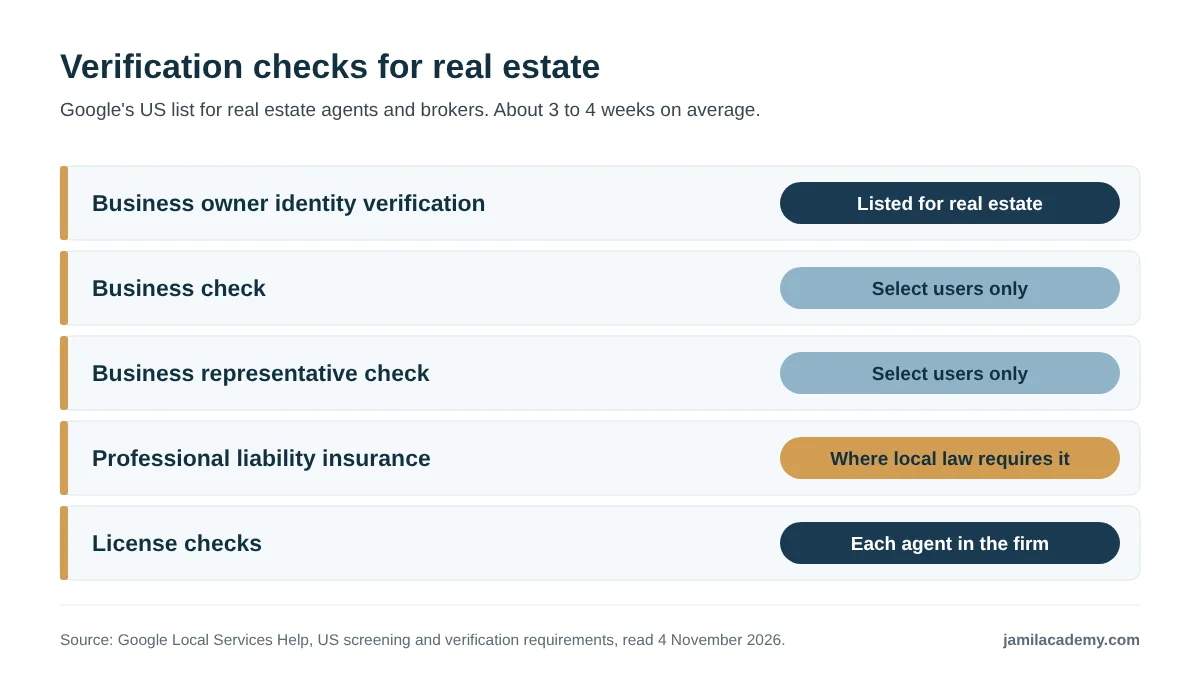
Short answer: every advertiser must complete verification. For real estate agents and brokers, Google lists owner identity, two business checks for select users, professional liability insurance where local law requires it, and license checks for each agent.
| Check | Who it applies to | Google's wording |
|---|---|---|
| Owner identity | Listed for real estate agents and brokers | "Business owner identity verification" |
| Business check | Select users only | "Business check (Select users only)" |
| Business representative check | Select users only | "Business representative check (Select users only)" |
| Professional liability insurance | Where applicable by local law | "Professional liability insurance*", "* = Where applicable by local law." |
| License checks | Each agent in the firm | "License checks for each real estate agent in the firm" |
Source: Google Local Services Help, "Business screening and verification requirements - United States", read 4 November 2026.
Background checks and the 21 states
Google says "In some states, real estate agents (including brokers and realtors) must complete a background check" for their license. "In those states, Local Services don't perform a separate background check."
It lists 21 states: Alaska, Arkansas, Connecticut, Delaware, Hawaii, Idaho, Indiana, Kentucky, Maine, Maryland, Massachusetts, Michigan, Montana, New Hampshire, New Mexico, New York, North Carolina, North Dakota, Ohio, Pennsylvania and Vermont.
Virginia and DC were not on the list as I read it. Google's general process page says "All owners of the business must complete a criminal background check" where checks apply. No page says every agent at a brokerage is background-checked.
Sources: Google Local Services Help, "Business screening and verification requirements - United States" and "Understand the screening and verification process", read 4 November 2026.
Verification, step by step
Google publishes no fixed order. These steps come from its process page, in my order.
- 1. Profile access. The person doing the checks must be an owner or manager of the Google Business Profile. This step can take up to 24 hours to show as done.
- 2. Identity. A government-issued photo ID, checked by Evident. Names must match across documents.
- 3. Licenses. Google checks state licenses against government databases where possible. For real estate, that is each agent in the firm.
- 4. Business registration, if selected. A D-U-N-S number, or a Secretary of State registration, IRS EIN or Department of Revenue registration.
- 5. Insurance, where local law applies. "The document must be active and valid for at least 14 days after the time of submission."
- 6. Wait. On average, Google says, the process takes 3 to 4 weeks after you submit your documents.
One third-party guide says 2 to 3 weeks. I would plan on Google's figure.
Sources: Google Local Services Help, "Understand the screening and verification process" and "Business screening and verification requirements - United States", read 4 November 2026.
Insurance for Virginia agents
The insurance line applies "Where applicable by local law." I found no Google page saying whether Virginia agents are asked for E&O proof.
The badge name conflict
Google's badge page describes "a single badge for all advertisers," and its business site says verified businesses "earn the Google Verified badge." The badge page adds: "Local Services Ads ranking won't be affected by this change."
The US screening page still says agents "have received the Google Screened badge based on the background check requirement." No page gives a date for the switch, so check your own profile.
Sources: Google Local Services Help, "About Google Verified badge" and "Business screening and verification requirements - United States", read 4 November 2026.
Do you need reviews to qualify?
I found no minimum. Google's performance page says: "We recommend 5 or more reviews." A third-party guide suggests more, without a source. Reviews are "managed through Google Business Profile Manager, not your Local Service Ads account."
Sources: Google Local Services Help, "Improve your Local Services Ads performance" and "Reviews and Ratings on Local Services Ads", read 4 November 2026.
My view: start verification before you plan a budget. Weeks of paperwork are the real first cost, and every agent on the profile faces a license check.
How much do Local Services Ads cost for real estate?
Short answer: Google does not publish a lead price for real estate. You pay for each valid lead, the price comes from competing bids in your market, and your budget caps the total.
The closest Google comes to a price is this line on its leads page:
Google Local Services Help, "How leads work"
The Home Listings Ads page, written for agents, says only: "Pricing varies dynamically by market." The bidding page explains why: "When similar local businesses bid on the same lead, those bids determine how much the lead is worth."
Sources: Google Local Services Help, "How leads work", "About Local Services Home Listings Ads" and "How bidding works for Local Services Ads", read 4 November 2026.
So what will you actually spend?
Your spend is your lead price times the leads you get, up to your budget. No Google page gives the price, so you find it in your own account. Even for a credited lead, "the original lead charge will still appear on your invoice."
When you hit your budget, "your ad won't appear for the remainder of the month (unless you adjust your budget)." That cap is your protection against a runaway bill.
Sources: Google Local Services Help, "About Automated Local Services Ads lead credits" and "How leads work", read 4 November 2026.
The one third-party number with a stated method
[Third party, weak] The agency 99calls published a Q1 2026 cost per lead table that shows "Real Estate: $15.30." It is the only real estate figure I found with any stated method, and I would not plan on it.
The agency says it analyzed 3,367 leads and $176,892 in spend "from real campaigns run for contractors in the U.S." It gives no real estate sample size, and the table is an image. One agency's client average is not a benchmark, so I kept it out of the calculator.
Source: 99calls, "LSA Cost Per Lead by Industry for Service Contractors (Q1 2026 Data & Insights)", Diane Lovine, 7 May 2026, updated 19 July 2026, a third-party agency blog, read 4 November 2026.
Google's business site also mentions sign-up credit offers tied to spend in your first 60 days. The amounts did not display when I read it.
To compare channels, see my breakdown of what real estate leads cost by source.
My view: treat the lead price as unknown until your account shows it, and judge results on closings, not lead count.
What counts as a charged lead?
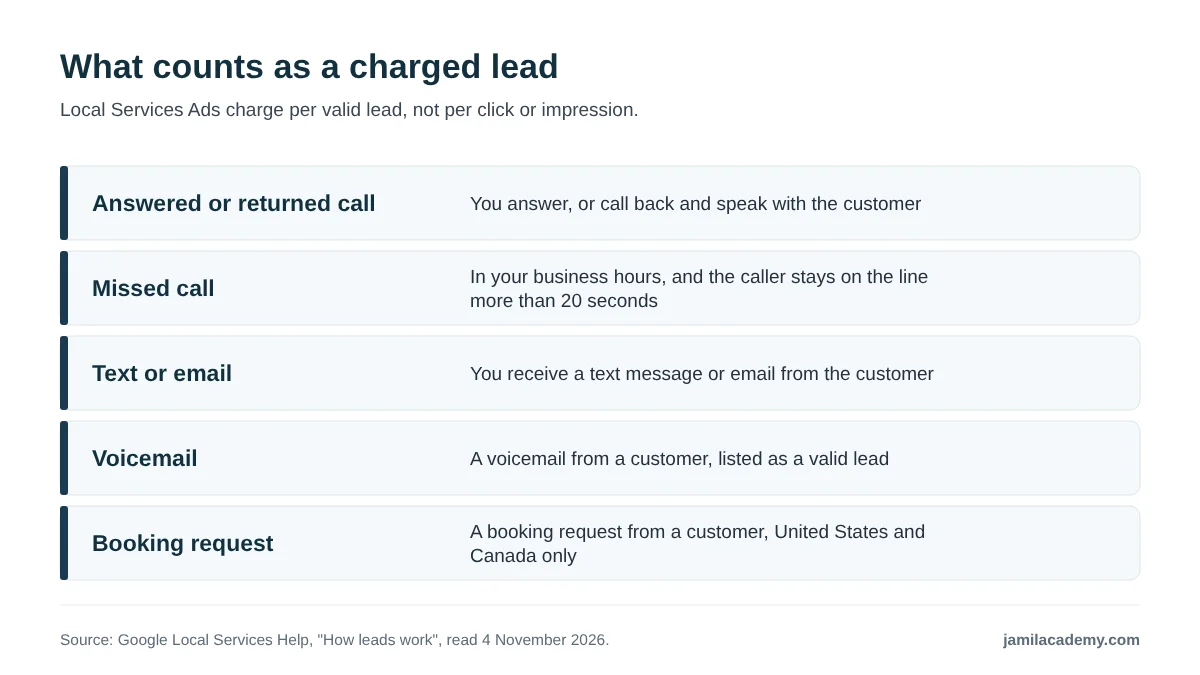
Short answer: Google charges for five kinds of contact. They are an answered or returned call, a qualifying missed call, a text or email, a voicemail, and a booking request in the US and Canada. Spam and duplicates are filtered out.
| Lead type | When it counts, in Google's words |
|---|---|
| Answered or returned call | "You answer a phone call or you call the customer back and speak with the customer." |
| Missed call | "You missed a phone call during your business hours and the customer stays on the line for more than 20 seconds." |
| Text or email | "You receive a text message or email from the customer." |
| Voicemail | Listed as a valid lead on the same page |
| Booking request | "You receive a booking request from a customer (United States and Canada only)." |
Source: Google Local Services Help, "How leads work", read 4 November 2026.
What you are not charged for
- Callers who drop off: "You won't be charged if customers don't press a key to get routed."
- Repeat contacts: follow-ups from the same number or email within 15 days are not charged again.
- Spam and duplicates: "Google's automated systems proactively filter out invalid activity (such as spam or duplicate contacts)."
The missed-call rule applies only during business hours. If you have not set hours, Google's default is 7 AM to 9 PM, so set your real hours.
Sources: Google Local Services Help, "How leads work" and "Manage leads and jobs", read 4 November 2026.
Automatic credits for bad leads
- Not charged: "Leads determined to be invalid or low quality are not charged."
- Credited later: charged leads "may be issued credits automatically if later determined to be low quality."
- Timing: "In most cases, credits will be applied to your account balance within 30 days."
- Feedback: you can also get "a bonus credit for leaving feedback." Open Leads and select "Rate this lead."
- No longer credited: "Google no longer supports credits for 'job type not serviced' and 'geo not serviced' leads."
As I read that last line, an out-of-area caller, or one wanting a service you do not offer, is no longer credited on those grounds. Google's advice: "If you're receiving unwanted leads, revisit your service areas, job types, and categories."
Source: Google Local Services Help, "About Automated Local Services Ads lead credits", read 4 November 2026.
What happened to lead disputes?
The older dispute process no longer appears on the page. A search snippet for an old Google help address still reads "You can dispute charged leads within 30 days of receiving them."
When I opened that address, it showed the automated credits page, with no dispute window. I treat the window as outdated.
My view: rate every bad lead. The feedback survey is one of the few levers you still control.
How do bidding and budgets work?
Short answer: you choose one of three modes and set a budget. Maximize leads lets Google set bids, a target cost per lead aims for an average, and Max per lead sets a hard cap. Google recommends a budget of at least 10 leads per week.
| Mode | What it controls | Google's wording |
|---|---|---|
| Maximize leads | Google sets your bid within your budget | "Let Google set your bid and get the most leads for your budget." |
| Target cost per lead (tCPL) | An average; single leads can cost more or less | "With TCPL, some leads may cost more than your target and some may cost less." |
| Max per lead | The most you pay for any one lead | "With Max Per Lead, your limit acts as a hard cap." |
Sources: Google Local Services Help, "How bidding works for Local Services Ads" and "New Bidding Option for Local Services Ads", read 4 November 2026.
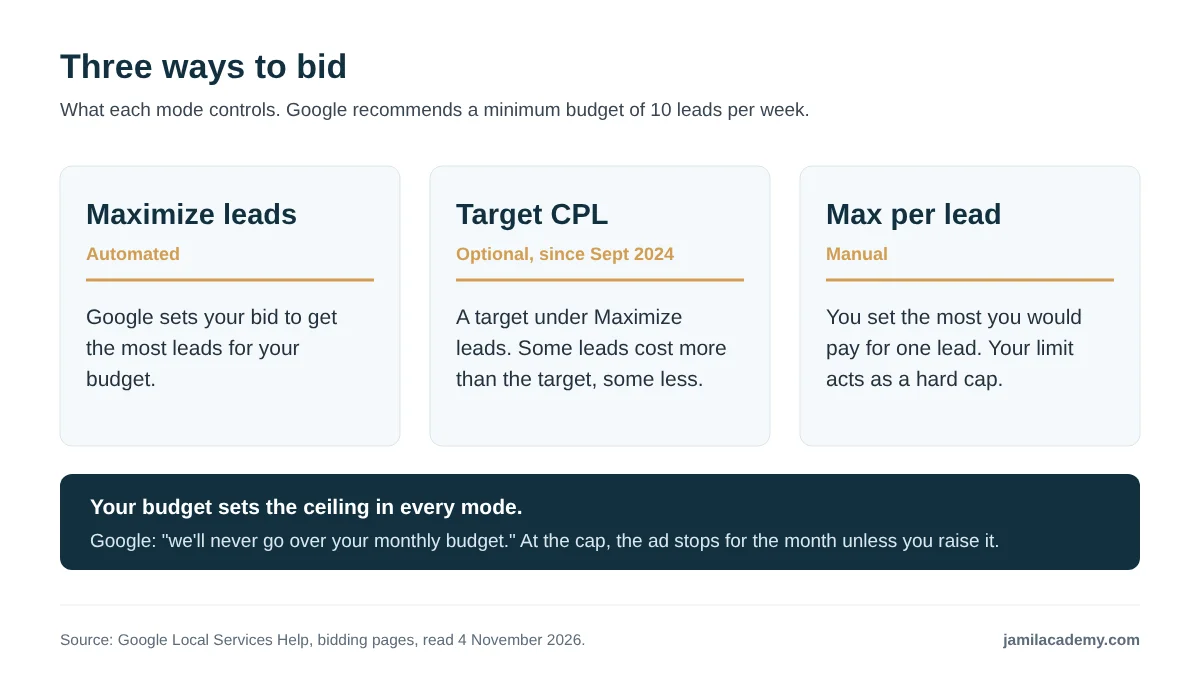
Google added the target option in 2024: "Starting in September 2024, you'll find optional target fields under the 'Maximize Leads' bidding strategy." Max per lead is the manual choice: "Manually set your own bid limit, which is the most you'd pay for a lead."
Google's performance page nudges you toward automation: "Select 'Maximize Leads' instead of the 'Max Per Lead' bidding strategy to automatically optimize your budget."
Sources: Google Local Services Help, "New Bidding Option for Local Services Ads", "How bidding works for Local Services Ads" and "Improve your Local Services Ads performance", read 4 November 2026.
Budget: weekly or monthly?
Google's pages disagree on the label. The bidding page says "Your weekly budget. The higher your weekly budget, the more leads you could get." It recommends "a minimum budget of 10 leads per week for optimal results."
The September 2024 page says "we'll never go over your monthly budget." My reading: you budget by the week, and Google will not exceed the monthly total. Check the label in your account.
Sources: Google Local Services Help, "How bidding works for Local Services Ads" and "New Bidding Option for Local Services Ads", read 4 November 2026.
For keyword campaigns, see my guide to PPC for realtors.
My view: start with Max per lead if you need price certainty, even though Google recommends Maximize leads. Once you know your market's lead price, automation is easier to judge.
Plan your lead budget with the calculator
Short answer: monthly spend is your lead price times leads per week times weeks per month. The planner starts at 10 leads a week, Google's recommended minimum budget. It sets the lead price and your conversion rates at zero, because Google publishes no price and only you know your rates.
An estimate, not a quote. Google publishes no real estate lead price, so no price is filled in. The 10 leads a week default is Google's recommended minimum budget ("How bidding works", read 4 November 2026). Gross commission is before your brokerage split, fees and taxes. Credits for low-quality leads are not included.
How the planner counts
- Spend: cost per lead times leads per week, then times weeks per month (4.33 is 52 weeks divided by 12, rounded).
- Clients and closings: leads per month times your lead-to-client rate, then your client-to-closing rate.
- Cost per closing and return on spend: monthly spend divided by closings, and gross commission divided by spend. Each shows only when its inputs are above zero.
Find your break-even lead price
You can work backward without Google's price. The most a lead can cost before it loses money on gross commission is your commission times your lead-to-client rate times your client-to-closing rate.
My view: use your own past rates. With no history, try a low and a high rate and see whether both work.
How does Google rank Local Services Ads?
Short answer: Google's ad rankings page names your bid, your responsiveness, the search itself, your relevance, whether message or booking leads are on, and your profile quality. I list only those.
| Factor | What Google's ad rankings page says |
|---|---|
| Bid | "The amount you bid is the maximum amount you're willing to pay for a lead, though you may end up paying less." |
| Responsiveness | "Missed calls may negatively affect your responsiveness." |
| The search | "The context of a customer's search," which includes "time of the search, location, and other characteristics." |
| Relevance | "How relevant your business is for the customer's search, for example, services you provide and your business bio." |
| Message and booking leads | "Enabling message and/or booking leads means there are more ways for customers to reach you" |
| Profile quality | "Your rating, number of reviews, average response time, use of high-quality images", plus completed verification checks |
Source: Google Local Services Help, "About ad rankings", read 4 November 2026.
Proximity, business hours and complaints do not appear on Google's ad rankings page, so I do not list them as factors. Location appears only as part of the search context.
Business hours matter for a different reason: they decide when a missed call becomes a charged lead. Missed calls may also hurt responsiveness, which is on the list.
Google's own tips, and two photo rules
- Respond fast: "quick response times can drive greater consumer engagement on your ad."
- Reviews: "We recommend 5 or more reviews."
- Photos: "Including high-quality photos in an ad can help you stand out on Google and get more leads."
- No identifying photos: "no personally identifying photos should be uploaded."
- EU and New York: "Starting August 2, 2026, Local Services Ads does not allow the use of AI-edited or AI-generated images" in the EU and New York state.
Sources: Google Local Services Help, "Improve your Local Services Ads performance" and the Local Services Ads requirements page, read 4 November 2026.
Rating and review count come from your Business Profile, and Google says "Customers are more likely to leave a review if the request comes from you directly." My guide to a Google Business Profile for real estate agents covers the profile itself.
Source: Google Local Services Help, "Reviews and Ratings on Local Services Ads", read 4 November 2026.
My view: responsiveness is the factor you control most. If you cannot pick up, narrow your hours rather than miss calls.
What are Home Listings Ads?
Short answer: Home Listings Ads are a Local Services Ads format that shows property listings with local agents, on mobile in the United States. You still pay per lead.
Google's help page says: "Currently, this feature is available in United States markets on mobile." It lists three requirements:
- "A verified Google Business Profile."
- "Create a Local Services Ads campaign and link the verified Google Business Profile."
- "Opt into the Buyer's agent or Seller's agent job types."
The listings "are provided by ComeHome, powered by HouseCanary." "Leads generated from a specific property listing include a property ID in your leads inbox." Pricing follows the usual rule: "Pricing varies dynamically by market."
The format "doesn't serve on Google Maps inventory," and reporting has no breakdown by ad format.
Source: Google Local Services Help, "About Local Services Home Listings Ads", read 4 November 2026.
The June 2026 rollout
Google's blog post dated Jun 11, 2026 says: "Following a limited pilot," "we're now rolling out richer Local Services Ads for Home Listings across all 50 U.S. states." No pilot start date is given.
It adds: "Existing LSA agents will automatically appear in this experience." And: "portal partners can enroll their agents through the LSA managed partner program."
The blog says buyers can "call, message or book an appointment" from the ad; the help page describes calling or messaging. Expect booking only where enabled.
Sources: The Keyword (Google blog), "Enhanced Local Services Ads for Home Listings bring homebuyers and local agents together", Jun 11, 2026; Google Local Services Help, "About Local Services Home Listings Ads", read 4 November 2026.
MLS data: a third-party claim
One third-party guide says listings show only if your MLS has opted in. Google's page names ComeHome and HouseCanary as the source and says nothing about MLS participation. I could not confirm whether Bright MLS listings appear.
My view: watch for property IDs on your leads. They show which leads came from listings.
How to set up Local Services Ads as an agent
Short answer: check eligibility, secure your Business Profile, create the campaign, pick job types and areas, pass verification, then set hours, bidding and budget. Google gives no single sequence for real estate. This order is mine, built from what each page requires.
- 1. Check eligibility with the tool on Google's US getting-started page.
- 2. Agree with your broker whose name the account and profile go under.
- 3. Secure a verified Google Business Profile, with owner or manager access for whoever does verification.
- 4. Create the campaign and link the profile.
- 5. Choose job types and areas: Buyer's agent or Seller's agent, and counties or cities rather than ZIP codes.
- 6. Complete verification: identity, a license check for each agent, and any business or insurance checks. Allow 3 to 4 weeks.
- 7. Set business hours. Without them, Google's default is 7 AM to 9 PM.
- 8. Choose bidding and budget, starting from Google's recommended 10 leads per week.
- 9. Finish the profile with a business bio and high-quality photos, and turn on message or booking leads only if you will answer them fast.
- 10. Work the leads daily, and use "Rate this lead" on bad ones.
Sources: Google Local Services Help, "Getting started with Local Services Ads - United States", "About Local Services Home Listings Ads", "Understand the screening and verification process", "Manage leads and jobs" and "About ad rankings", read 4 November 2026.
Giving your team access
Google says "You can share your Local Services Ads account with other people in your business," and "you can limit which features can be used." "Access to your account's billing is controlled separately within the Payments profile."
A manager account "is required for features like consolidated monthly billing," which may suit a brokerage with several profiles. These rules do not apply if you advertise through a partner.
Source: Google Local Services Help, "Manage access to your Local Services Ads account", read 4 November 2026.
My view: give an assistant lead access, but keep billing with whoever signs off on spend.
Which rules apply: call recording, fair housing and your broker
Short answer: Google records inbound calls in the US and Canada, housing ads cannot target by gender, age, parental status, marital status or ZIP code, and in Virginia your firm's licensed name must be on all advertising. In my view, clear the ads with your principal broker first.
Call recording
Google says "in the US and Canada, all inbound calls from customers via the Google forwarding number are recorded by Google." Callers "are notified of this by a pre-recorded message." The page does not say whether recording can be turned off, so tell anyone who answers your calls.
Source: Google Local Services Help, "Manage leads and jobs", read 4 November 2026.
Housing ad targeting limits
Google's housing policy says: "In the United States and Canada, you can't target audiences using:" gender, age, parental status, marital status or ZIP codes. Its stated aim is "to help ensure equitable access to opportunities in Housing."
The Home Listings Ads page adds that Google does not allow advertisers to "target ads based on sensitive criteria like race," citing the Fair Housing Act.
Sources: Google Advertising Policies Help, "Restricted targeting in Personalized advertising"; Google Local Services Help, "About Local Services Home Listings Ads", read 4 November 2026.
Virginia: your firm's licensed name
Virginia's rule 18VAC135-20-190 says: "The firm's licensed name must be clearly and legibly displayed on all advertising." It also puts advertising under the supervision of the principal or supervising broker.
The rule does not mention online ads. It reaches them through 18VAC135-20-10, which defines advertising as communication through "any medium." No source says whether an ads profile name field satisfies it.
Sources: Virginia Administrative Code 18VAC135-20-190 and 18VAC135-20-10 (as amended effective April 1, 2026), read 4 November 2026.
Outside Virginia, check your own state's rules. I did not check other states or NAR advertising rules. Google also says you "should not provide erroneous information about accounts or account ownership, qualifications, licenses, insurance."
My view: before you spend anything, show your principal broker the profile name and the areas you plan to serve. It is a short conversation that protects your license.
Are Google Local Services Ads worth it for realtors? My view
Short answer, and this is my opinion: worth testing if you answer calls quickly, already have reviews and know your own conversion rates. I have no performance data to share, so the case rests on the calculator math.
Your break-even lead price is your commission times both of your conversion rates. If your account's price sits below it, the ads can pay before your split. Above it, they cannot. Because prices vary by location, that test is local.
Who I think should test it, and who should wait
- Test it: agents who pick up the phone, have a verified, reviewed profile, track leads to closing and have broker approval.
- Wait: agents who cannot answer during set hours, have no spare budget for a month of testing, or work where the eligibility tool shows no coverage.
Weighing this against portal leads? My breakdown of what Zillow Premier Agent costs lets you compare on cost per closing.
My view: run a short, capped test with Max per lead, track every lead to closing, and decide on cost per closing. Lead counts alone will not tell you whether it worked.
What I could not verify
These are the gaps I hit. Be careful with any page that fills them with a confident number.
- An official real estate lead price. Google says only that pricing varies by market.
- A manual dispute process. The 30-day dispute snippet leads to a page about automated credits.
- All real estate job types. Only Buyer's agent and Seller's agent are named.
- Which US markets qualify. I did not run Google's eligibility tool.
- Agent or brokerage accounts, team rules, or any license-number display rule.
- Background checks for every agent. Only license checks per agent are stated.
- E&O for Virginia agents. Not stated.
- The badge. Whether real estate profiles still show Google Screened, and when the switch happened.
- Turning off call recording. Not addressed.
- MLS participation in Home Listings Ads, including Bright MLS.
- The Home Listings Ads pilot start date.
- Sign-up credit amounts. They did not display.
- Two Google pages I did not open: approved screening partners and linking a Business Profile.

Frequently asked questions
How much do Google Local Services Ads cost for real estate agents?
Google publishes no real estate lead price. Prices vary by location, job type, lead type and bidding mode. Google recommends a budget of at least 10 leads per week.
Do you pay per click with Local Services Ads?
No. Google says you pay for leads, "not for clicks or impressions," such as calls, qualifying missed calls, messages, voicemails and bookings.
How long does Local Services Ads verification take for realtors?
Google says 3 to 4 weeks on average after you submit your documents.
Do I need reviews to run Local Services Ads?
I found no minimum in Google's pages. Google recommends 5 or more reviews, and rating and review count are part of profile quality in its ad rankings.
Can real estate agents target ZIP codes in Local Services Ads?
No. Google says real estate agents and brokers in the US and Canada can't target their ads by postal code. Its housing policy also bars ZIP code targeting.
Can I get credit for bad Local Services Ads leads?
Google issues automatic credits for leads later found to be low quality, usually within 30 days. It no longer credits leads marked job type not serviced or geo not serviced.
What are Local Services Home Listings Ads?
A mobile, US format showing listings from ComeHome, powered by HouseCanary, with local agents. You need a linked, verified Business Profile and the buyer's or seller's agent job type.
Are Local Services Ads calls recorded?
Yes. Google says that in the US and Canada, inbound calls through its forwarding number are recorded, and callers hear a pre-recorded notice.
Saad Jamil is a top 1 percent Realtor with Samson Properties in Chantilly, Virginia, licensed in Virginia, DC, Maryland and West Virginia since 2013, with more than $500 million in career sales and 900+ homes closed. Reviews and closed sales are on his Zillow profile. He runs Jamil Academy, which sells training to agents. This article is general information, not legal or financial advice, checked on 4 November 2026.
Free: 5 Ways to Get More Listings Without Cold Calling
Five lead strategies that work without cold calls or ad spend, from an agent with $500M sold and 900+ homes closed.
No spam. Unsubscribe any time.
Your Coach